What is a good password policy?
A good password policy is a relative concept. However, as hackers we can tell you the best way to roll out this password policy.
At Tozetta, we get a lot of questions about how cybercriminals break into organizations. There are countless ways to imagine this, and the entry point can be different for every organization. Still, we see one aspect that is often overlooked but is crucial for protection against cyberattacks. We're talking about the use of weak passwords and the absence of a password policy.
As hackers, we know better than anyone that weak passwords can make it very easy for cybercriminals to carry out a hack. That's why we're diving deeper into creating a strong password policy for your organization. Curious how cybercriminals can crack your password first? Read more here about how cybercriminals can find out your password.
The problem of weak passwords
A common problem in the world of cybersecurity is the use of weak passwords. People often choose passwords that are easy to guess, such as "CompanyName123!" or "Spring2024", or they use personal information such as family members' names or birthdays (this information is easy to find across all kinds of social media channels).
These passwords are extremely vulnerable to brute force attacks, in which hackers use automated tools to try thousands of possible password combinations until they find one that works. These are often based on gigantic databases of common or previously leaked passwords.
The problem of a poor password policy
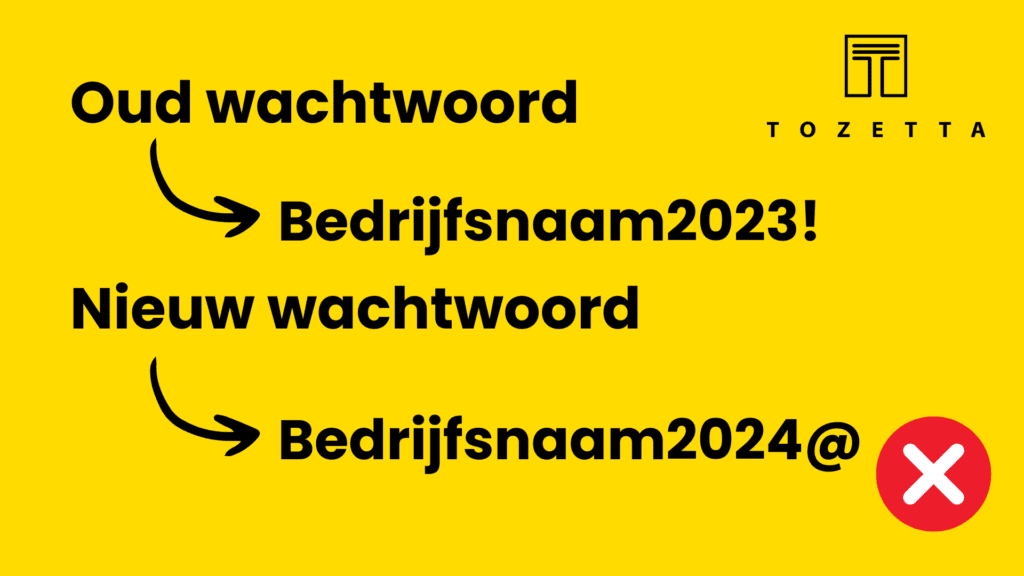
In addition to weak passwords, the problem is made worse by insecure password policies within organizations. Too often we see that password reuse is allowed, and that simple password variations are accepted... An example of a password variation is shown below. Through brute forcing, these kinds of passwords are extremely easy to guess.
Combined with a lack of regular password changes, no multi-factor authentication (MFA), and no way for employees to generate and remember unique passwords for all accounts (password manager), this creates a vulnerable situation. This opens a door for cybercriminals that we would very much like to keep closed.
How do you create a strong password?
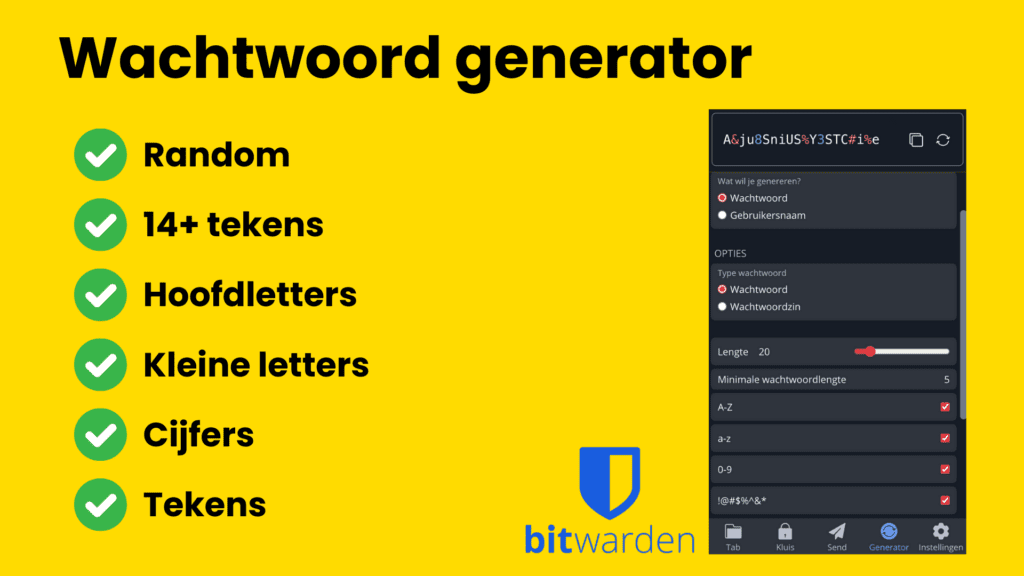
A strong password is best created using a password generator. This is often built into password manager tools. At Tozetta we have experience with BitWarden, KeePassXC and 1Password — but be sure to do your own research into the password management tool that suits your organization. We don't give advice on this!
The great thing about a tool is that you can create a unique password for every account, without the user having to remember it. The problem with using the same password everywhere is that after a data breach, cybercriminals can easily also log in to other accounts with your leaked password (unless you have multi-factor authentication).
The tool generates and remembers the password for employees, who then only need to remember one unique "master password" to access the password management tool. Below is an example of the password generator built into BitWarden.
Unique master password
You also need a password to access the password management tool. Make sure it meets the criteria above. The more characters, the harder it becomes to crack the password. Personally, we recommend a passphrase. Just make sure the words have nothing to do with you. Examples could be:
- Castle6-mountain-stars*
- highway_live5_working
After taking a bit of time to memorize this and then using the password a few times, you'll have a password that's easy to remember and gives you access to your password manager. This is extremely difficult for a cybercriminal to crack. Combine this with MFA and you have two good locks on your digital vault.
How do you ensure strong passwords within your organization?
A good password policy! If your organization has a number of points in order, employees will be required to comply, but will also be aware of the risks of weak passwords. It's about finding the right balance between security and usability, but with the following points we hope to already improve your cybersecurity somewhat:
- Train staff through cyber security awareness training. Make the cyber risks clear and inform employees about creating a secure digital work environment.
- Keep in mind that your employees need a password management tool to create and remember unique passwords for all accounts.
- Make sure Multi-Factor Authentication is mandatory wherever possible — think of it as an extra lock on the digital door!
- If possible, make sure password variations are not allowed, or that staff are aware of brute forcing and how easy it is to guess these password variations.
- Make sure passwords are changed every few months.
What about our organization's Leaked Credentials?
Almost every organization has fallen victim to cybercrime at some point, if not directly, then most likely indirectly. Think, for example, of an account on a platform that an employee created using their work email. This platform becomes a victim of cybercrime, and your employee's email address and password get stolen. This information is then sold online and ends up in (dark web) databases.
What can I do about this?
Over the past few years, Tozetta has found an enormous number of these kinds of databases and we use this in our ethical hacking work. Now we're also using this knowledge and information to help you. We do this through a Leaked Credentials Scan.
This means we research your company within these databases. There may be leaked credentials of employees that we find, and these passwords can then be excluded from use in your software and systems. In addition, employees can be informed, because passwords are often reused both privately and professionally...
After a leaked credentials scan, you receive a report with our findings. If we don't find anything? Then we don't charge any costs either! The cost of a leaked credentials scan is €250, excl. VAT.